Document types
Creating, changing and retiring document types.
Many documents must be kept for a certain time by law, invoices for example for ten years. For this, PDFMAILER.FLOW has document types: every document is filed as a type, such as “Billing document” or “Contract”, and the type determines how long it must not be deleted. As long as this deletion lock applies, nobody can delete the document, not even an administrator. You manage document types in Settings under Document types; this requires administrator rights.
When it is set up, your organization receives four document types that can be used immediately:
- Billing document – for incoming and outgoing invoices. Invoices receive this type automatically. They are locked for ten years from the end of the year in which they were issued, starting from their receipt.
- Contract – for contracts. Also locked for ten years.
- E-mail – for received emails. Without a deletion lock.
- Other – for everything else. Without a deletion lock.
You can adapt these types or create further ones, for example for delivery notes or personnel records. If in doubt about which retention periods apply to your company, clarify this with your tax advisor.
Create a document type
Create a type of your own when you have to keep a kind of document differently from what the supplied types provide for.
- Click New type.
- Enter a name, for example “Delivery note”.
- Under Retention, specify how long documents of this type are kept. The settings are explained below.
- Click Create type.
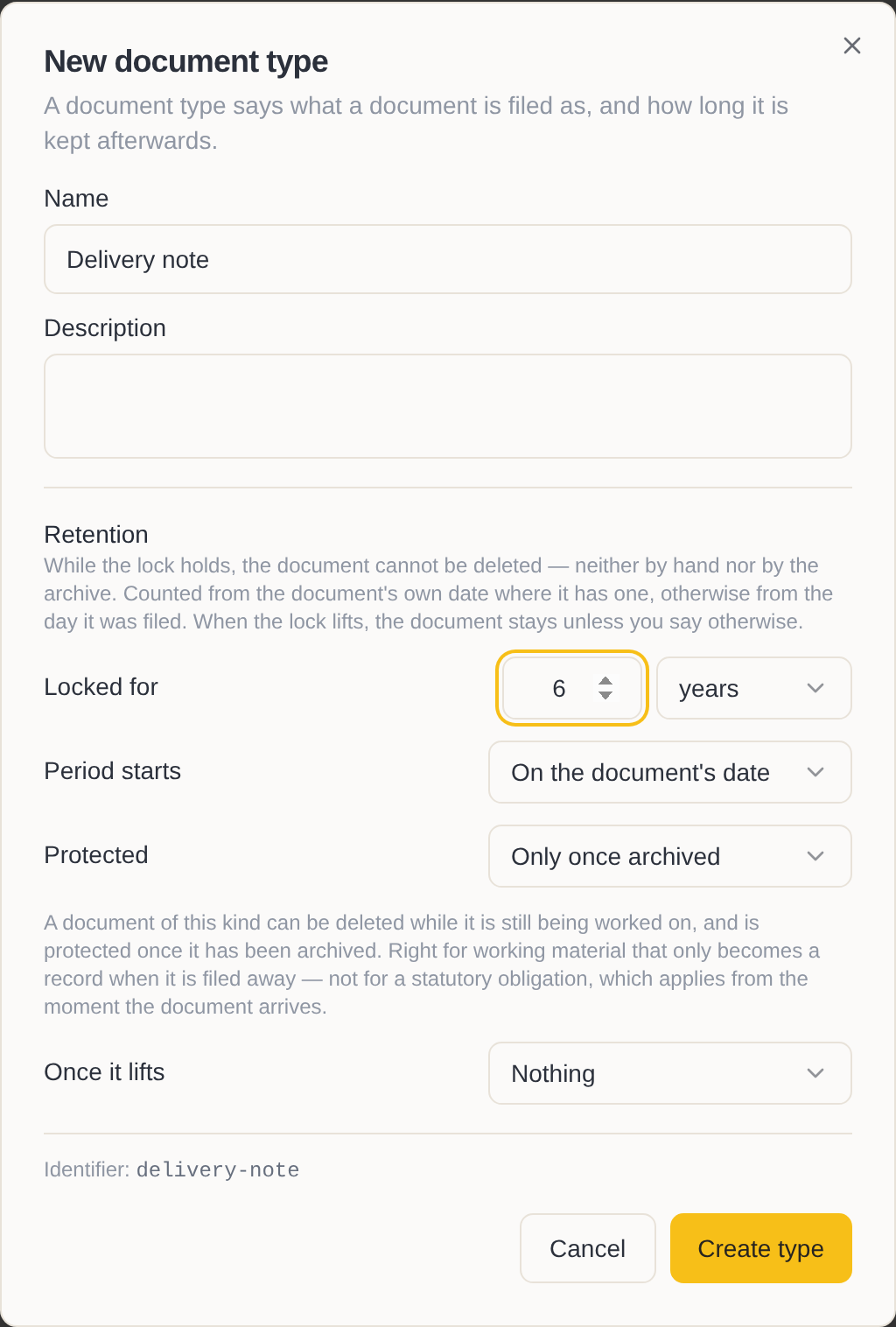
The new type is available for selection from now on when a document is filed or archived.
Set the retention
How long: Under Locked for, enter the period in years, months or days. If you enter no period, the type has no deletion lock; how long the document is kept is then decided by the archive folder in which it is located.
From when: Under Period starts, choose whether the period begins on the document's date or at the end of the year in which the document is dated. Statutory retention periods usually begin at the end of the year.
Protected since when: Under Protected, choose from when the lock takes effect.
- While still in progress protects the document from its receipt. This is right for documents with a statutory retention obligation, such as incoming invoices: they must not be deleted even during the review.
- Only once archived leaves the document deletable while it is being processed and protects it as soon as it is archived. This suits records that become binding only when they are archived.
What happens afterwards: Under Once it lifts, choose whether, after the lock has expired, the document is kept further (Nothing), deleted (Delete) or deleted after an additional waiting period (Delete after a wait).
Change a document type
Change a type when the retention obligation has changed or its name is misleading.
- In the list, move the mouse over the type, click … and choose Edit type.
- Change the name or the retention.
- Click Save.
A changed period applies to documents filed from now on. Documents that are already filed keep the period with which they were filed. This way every document remains protected for at least as long as was specified when it was filed.
If you have extended the period, PDFMAILER.FLOW offers to place the documents of this type that are already filed under the new period as well. To do so, click Hold them to the new terms.
You correct a single document that was filed as the wrong type on the document itself, see Retention periods.
Retire a document type
When a type is no longer needed, retire it instead of deleting it. Documents that are already filed as this type then keep their type and their period.
- In the list, move the mouse over the type, click … and choose Edit type.
- Switch off Active.
- Click Save.
The type is thereby retired and is no longer offered for new documents.
Delete a document type
Delete a type that was created by mistake and has never been used.
- In the list, move the mouse over the type and click ….
- Choose Delete type and confirm.
If no document is filed as this type, it is deleted. If a document is still filed as it, the type is retired; the document keeps it.